Schema markup is structured data that you embed in a page’s HTML so machines can read what the page is about. It is code that tells search engines who the company is, what the page covers and who wrote it, and for a few types it can earn rich results. It does not boost rankings, and it does not guarantee a rich result or an AI citation.
This guide covers the types a business site needs first, which page gets which markup, one worked example and how to test it. If you would rather hand the technical work to a team, our B2B SEO services include it.
What schema markup is and how it works
Schema markup has two layers. The first is the vocabulary, which comes from schema.org, a project founded by Google, Microsoft, Yahoo and Yandex. The second is the format you use to write that vocabulary into a page.
Search Central defines structured data as “a standardized format for providing information about a page and classifying the page content”. It describes facts a visitor can already see, labelled so a machine can read them. A page that shows a company name, a logo and an author byline can say the same things in schema.
JSON-LD, Microdata and RDFa
Three formats are supported, and the docs recommend JSON-LD if your site’s setup allows it. In the JSON-LD format, the markup sits in its own <script type="application/ld+json"> container, apart from the visible page.
Microdata works differently. It adds attributes such as <meta itemprop="name" content="Northwind Analytics"> directly into your HTML, mixed in with the content. That makes it harder to review and easy to break when a designer edits a template.
For B2B sites we recommend JSON-LD. Templates can generate it, and a developer can read all of it in one place.
Types, properties and values
Every schema block follows the same pattern. A type names the thing being described, such as Organization, Service or BlogPosting. Properties describe it, such as name, logo or sameAs, and each property holds a value. The rest of this guide uses that model.
Why it matters for your website
Markup matters because it removes guesswork. A business site that states its company name, services and authors in a consistent, machine-readable way is easier to classify.
Rich results Google still shows
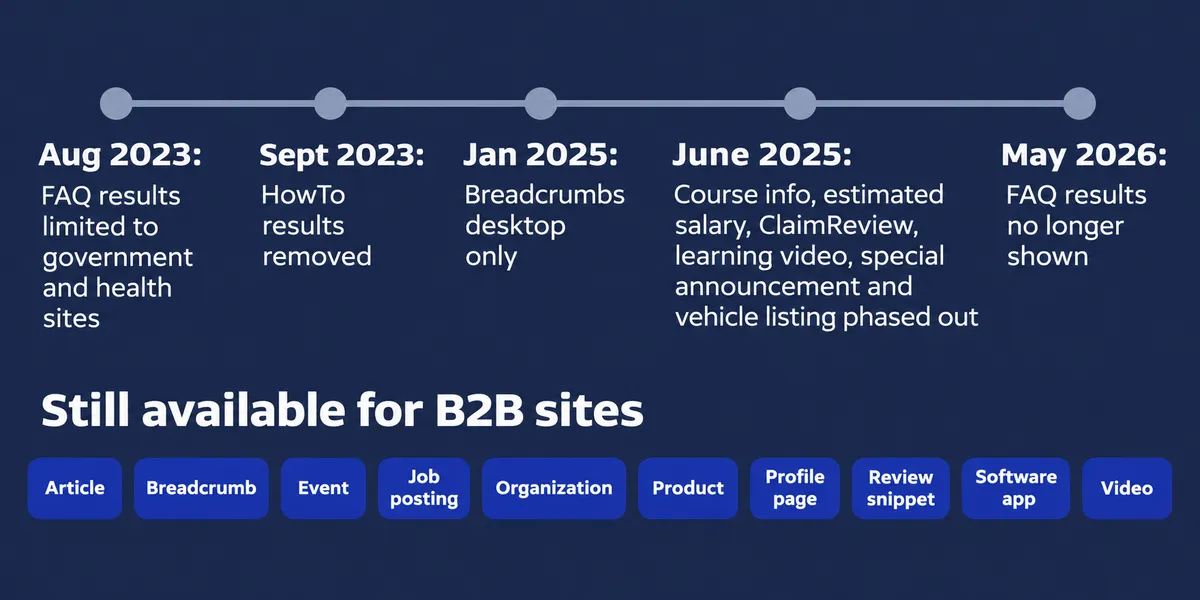
Rich results are search listings with extra visual features, such as a logo or an image. The search gallery lists 25 features, and a B2B site can use these:
- Article
- Breadcrumb (desktop only since January 2025)
- Event
- Job posting
- Organization (logo and details)
- Product
- Profile page
- Review snippet (for software apps and products, not your own company)
- Software app
- Video
Several features are gone. HowTo rich results were removed in 2023, and FAQ results were limited to government and health sites that same August. The changelog shows FAQ results stopped appearing on 7 May 2026. The search engine also began phasing out course info, estimated salary, ClaimReview, learning video, special announcement and vehicle listing in June 2025, then practice problem and dataset in November 2025.
What schema markup does not do
Search Central makes no promises for any page, so treat schema as groundwork, not a growth tactic. Its policies say that “Google does not guarantee that your structured data will show up in search results”. Old FAQ or HowTo markup does not cause problems either, so there is no rush to delete it.
Featured snippets are a separate feature, and you cannot mark a page up to win one. Read how featured snippets work for B2B queries for what does move them.
B2B buyers search brand names, tool names and comparisons. Clear data about who you are, what you sell and who wrote a page reduces ambiguity for search engines and for the systems that build AI answers.
Is schema markup a ranking factor?
No. Adding schema does not make a page rank higher. John Mueller said in April 2025 that “Structured data won’t make your site rank better”. The policy page says a structured data manual action removes rich result eligibility but “doesn’t affect how the page ranks”.
What schema can do is change how a listing looks and make entities clearer. Those are real benefits, just not ranking ones.
The schema types a B2B site needs first
Start with the foundation and add types as your site grows. This is the priority order we use.
Organization schema on one page, not sitewide
Organization schema describes the company. Google’s guidance is to put it on the home page or one About page, and “You don’t need to include it on every page of your site”. No properties are required, but name, legal name, logo, contact point, address, sameAs and founding date are recommended. The logo should be at least 112x112 pixels.
Use the most specific subtype that is true. LocalBusiness or ProfessionalService fits a company that serves clients from a real office.
Article and BlogPosting
Article markup suits blog posts, guides and case studies. It can help the search engine show better titles, images and publication details. Recommended properties are headline, image, datePublished, dateModified and author with a name and link.
Person for your authors
Person markup labels who wrote a piece and ties the byline to an author page. Keep expectations modest, because it names the author and does not prove expertise. Our guide to E-E-A-T and author signals covers the trust side.
Service for what you sell
Service is the schema for service pages, with properties such as provider, serviceType and areaServed. Nothing in the gallery covers it, so the value is understanding, not display. It is still worth writing because it states plainly what the company sells.
BreadcrumbList
BreadcrumbList describes where a page sits in the site hierarchy. Breadcrumbs display on desktop results only.
SoftwareApplication and Product
SaaS companies can mark software pages up as SoftwareApplication. It is a live feature and can be eligible for review snippets, as long as the reviews are genuine, third-party and visible on the page.
Event, JobPosting and VideoObject
Webinars suit Event. A careers page with open roles suits JobPosting. A demo or explainer video suits VideoObject. Each is a short block and each matches a live feature.
Which B2B pages get which types
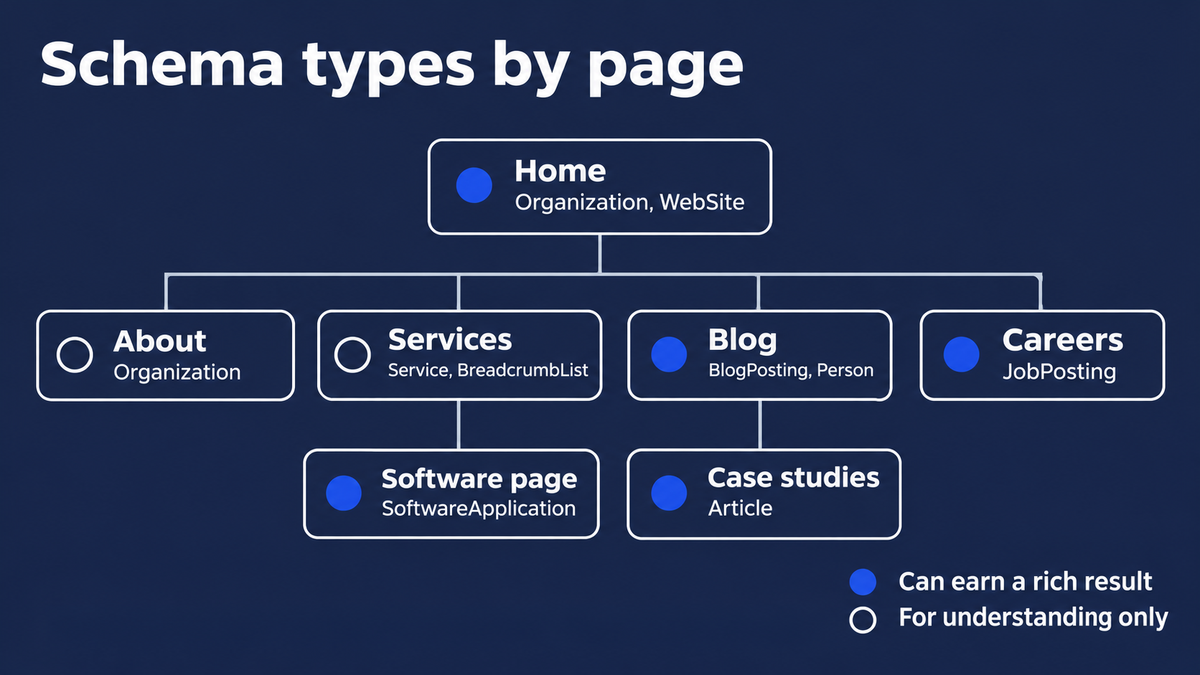
Here is the map we hand to developers. The last column marks which types earn a search feature and which are for understanding only.
| Page | Types | Key properties | Rich result? |
|---|---|---|---|
| Homepage | Organization, WebSite | name, logo, sameAs, contactPoint | Logo and details |
| About | Organization | foundingDate, address, sameAs | Logo and details |
| Service page | Service, BreadcrumbList | provider, serviceType, areaServed | Breadcrumb only |
| Blog post or guide | BlogPosting, Person, BreadcrumbList | headline, datePublished, author, publisher | Article, breadcrumb |
| Case study | Article | headline, dates, author | Article |
| Author page | Person, ProfilePage | name, jobTitle, worksFor, sameAs | Profile page |
| Software or offer page | SoftwareApplication or Product | name, offers, applicationCategory | Software app |
| Pricing page | Offer, only for a real priced offering | price, priceCurrency | None on its own |
| Webinar page | Event | name, startDate, location | Event |
| Careers page | JobPosting | title, datePosted, hiringOrganization | Job posting |
| Contact page | Organization contact details, if not on the About page | contactPoint | None |
A case study can name the client in markup only if the client is named on the page. If a case study is anonymous, mark up the article and nothing more.
An Organization JSON-LD example for your business
This is a minimal block for a fictional company, placed on the home page. Notice the @id, the sameAs links and the nested contact point.
{
  "@context": "https://schema.org",
  "@type": "Organization",
  "@id": "https://example.com/#organization",
  "name": "Northwind Analytics",
  "url": "https://example.com/",
  "logo": "https://example.com/images/logo.png",
  "description": "Analytics software and consulting for logistics teams.",
  "sameAs": [
    "https://www.linkedin.com/company/northwind-analytics",
    "https://www.crunchbase.com/organization/northwind-analytics",
    "https://www.youtube.com/@northwindanalytics"
  ],
  "contactPoint": {
    "@type": "ContactPoint",
    "contactType": "sales",
    "email": "sales@example.com"
  }
}
The @id is a stable identifier, such as https://example.com/#organization, that other blocks point to. A blog post’s publisher, a service page’s provider and an author’s employer can all reference that same @id. The site then describes one company, not five unrelated ones.
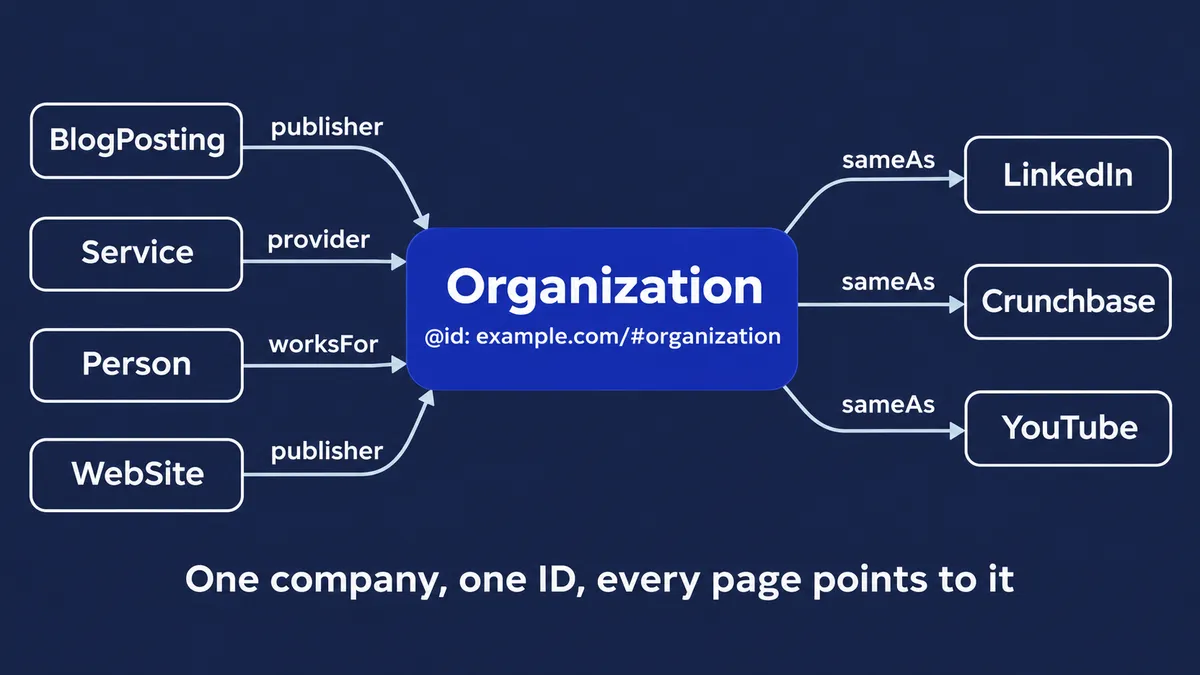
The sameAs property links to profiles on other sites with additional information about your organization. Pick profiles you control and keep them current.
We work this way on our own site. The homepage defines the company once, with an @id and sameAs links to its LinkedIn, Instagram, Facebook and YouTube profiles. Every blog post emits one graph made of a BlogPosting, a Person and a BreadcrumbList, and its publisher points back to that company @id. The B2B SEO page’s markup names the same company as provider.
How to add JSON-LD to your site
Follow these steps in order.
- List your page templates and map each one to types, using the table above.
- Write or generate the JSON-LD. A developer, a CMS plugin or your own templates can do it, but generate it from the same data that renders the page so the two cannot drift apart.
- Put the schema on the page it describes, inside a
<script type="application/ld+json">tag, in the head or the body. - Test it before release.
- Deploy, then watch Search Console.
Templates are where B2B sites win with schema, because one fix covers every post or offer page. For where this work fits in a B2B SEO engagement, see our B2B SEO agency process.
How to test and monitor it
Testing takes minutes and catches most problems on your website before a page goes live.
Testing a live page
The Rich Results Test checks features the search engine supports, using a live address or a pasted snippet. Run it on every template.
Validating the full graph
The Schema Markup Validator checks any markup that follows the shared vocabulary, including types the search engine does not display, such as Service. Use it to check the full schema graph, not only the pieces that earn a feature.
Search Console reports
Search Console shows enhancement reports, plus the inspection tool and Manual Actions. The old Structured Data Testing Tool was retired in 2021 and its schema checks moved to the Schema Markup Validator, so skip any guide that sends you there.
Common mistakes B2B teams make
Marking up content visitors cannot see
Search Central’s policy is blunt: “Don’t mark up content that is not visible to readers of the page.” That covers FAQ markup with no visible FAQ and reviews hidden from visitors.
Review stars on your own testimonials
Testimonials can stay on the page. Do not mark them up for stars on Organization or LocalBusiness, because self-serving reviews are ineligible.
Wrong, mixed or stale data
Common slips include a retail type on a service page, NewsArticle on a blog post, an old phone number, an expired event or a logo that changed. Match the visible page every time.
A few quick fixes help:
- Remove markup for anything a visitor cannot see.
- Update contact details and logos in one template, not page by page.
- Retire events once they have passed.
- Re-run both test tools after every redesign.
Most schema work sits inside technical SEO, and it rewards a regular check.
Does it help AI Overviews and AI search?
Schema helps AI search only indirectly, not through a special switch. Google’s AI features page says no special structured data is needed for AI Overviews or AI Mode, and it recommends markup that matches the visible text.
Clear entity facts still help every system that reads your pages. For the wider picture, see answer engine optimization and our guide to getting your company recommended by ChatGPT.
A starter checklist
- Company details on the home or About page, with an
@idand sameAs links - Article or BlogPosting on posts, with author and dates
- Person on author pages
- Service on each page that sells something
- BreadcrumbList in your templates
- A pass through both test tools before release
- A recheck after any site change
If you want a second pair of eyes, ask us to review your markup.
Frequently Asked Questions
Is schema markup the same as structured data?
Nearly, and most people use the terms interchangeably. Structured data is the general idea of labelled, machine-readable page information. A shared vocabulary does most of the labelling, and schema markup is that vocabulary written into a page, usually as JSON-LD.
Is FAQPage still worth adding?
Google stopped showing FAQ rich results on 7 May 2026, after limiting them to government and health sites in 2023. Markup for a FAQ that is visible on the page does no harm and still labels the questions and answers, but expect no search feature from it. Never mark up questions that are not on the page.
Do I need a developer to add the code?
Not always. Many CMS platforms and SEO plugins generate basic markup, and a template change covers the rest. For B2B sites, the best results come from generating the markup in page templates from the same data the page shows, then testing it before release.
Can I show review stars for client testimonials?
No, not for reviews of your own company. Reviews a business controls about itself count as self-serving, so Organization and LocalBusiness pages are not eligible for stars. Software pages with genuine third-party reviews can be eligible.
Does the search engine use this for AI Overviews?
Google says no special structured data is needed to appear in AI Overviews or AI Mode. Accurate markup that matches the visible page helps systems understand who you are and what you offer, but it is not a switch for citations.

Written by
Adriaan van Swieten
Adriaan leads Stijg Media and works directly on search, AI visibility, websites, and local growth strategy.
Meet Adriaan