Featured snippets are the answer boxes Google shows above the regular search results, quoting a passage from one web page and linking to it. Business buyers often research a purchase for weeks, and the page Google quotes often becomes the first source they read. The same short, clear passages also feed AI Overviews, so the work pays off in more than one place.
This guide covers what featured snippets are, which types exist, whether they bring clicks, how to find opportunities and how to win them. It sits inside a bigger picture of SEO for business-to-business companies, where answer-first content is one tactic among many, not a trick. Snippet work fits best inside a wider SEO and content marketing plan, not as a hunt for a single box.
What Featured Snippets Are and How Google Picks Them
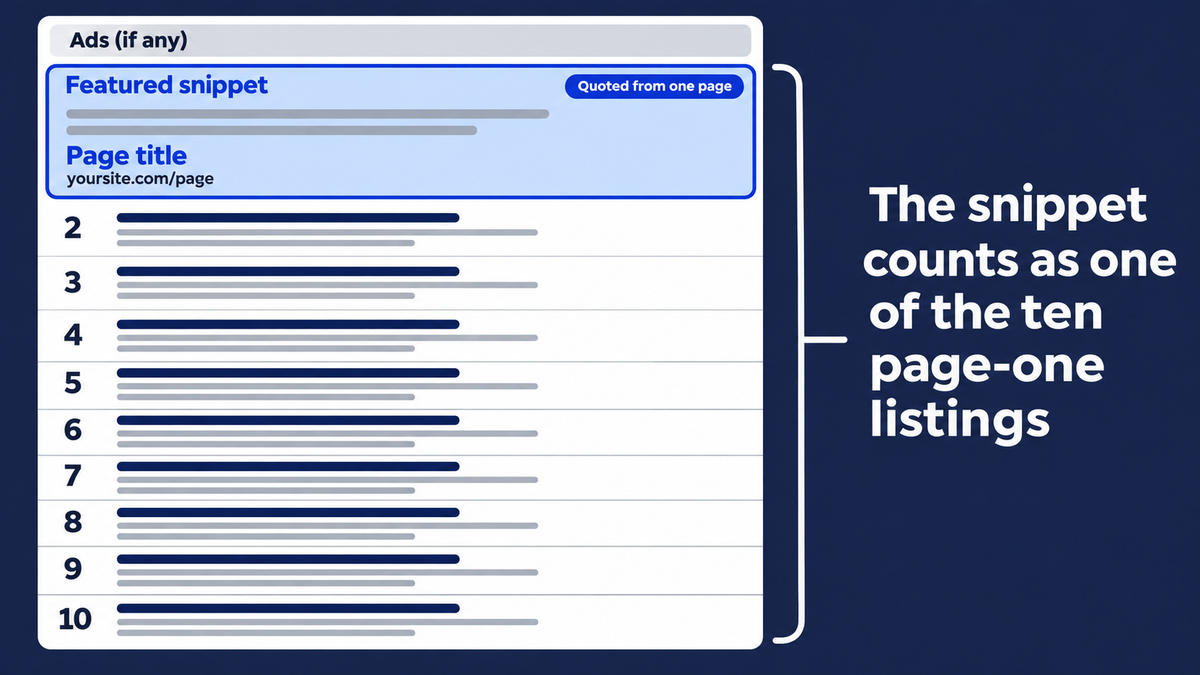
A featured snippet is a special box on Google’s page where the layout of a normal listing is reversed: the descriptive wording comes first and the page title and link sit underneath. Google describes this on its featured snippets documentation page. The box can hold a paragraph, a list, a table or a video.
Google picks featured snippets automatically. Its documentation says you cannot mark your page as a featured snippet, because its systems decide whether a page would make a good one. Google also said in 2018 that it may show no featured snippet when content is low quality or when it is not confident the page matches the question.
A page usually needs to rank on page one before it can win a snippet. A 2017 Ahrefs study found that 99.58% of featured snippets came from pages already in the top 10. That data is old, but the logic still holds: a snippet is a reward for a page that already looks relevant, not a shortcut around ranking.
Snippets vs rich snippets
Rich snippets, which Google calls rich results, are a different search feature. They come from markup and add extras such as star ratings or product details to a normal listing. A featured snippet comes from the copy on your page, and no markup can force it.
Types of Featured Snippets
Featured snippets come in four main shapes, plus video, and the one Google picks follows the question. The table below shows each with an example query a business buyer might type. The example queries are illustrations, and we are not claiming search volumes for them.
| Snippet type | Typical query | Business-buyer example query | What to write |
|---|---|---|---|
| Paragraph | what is, why, definition | ”what is SOC 2 compliance” | A one or two sentence definition right under a question heading |
| Numbered list | how to, steps | ”how to migrate from on-prem ERP to cloud” | Ordered steps, each starting with a verb |
| Bulleted list | types, best, examples | ”types of warehouse management systems” | A short bullet list after a lead-in sentence |
| Table | compare, cost, specs | ”API rate limits by plan” | A real HTML table with a header row |
| Video | how to, visual tasks | ”how to set up SSO in a SaaS product” | A YouTube video with chapters |
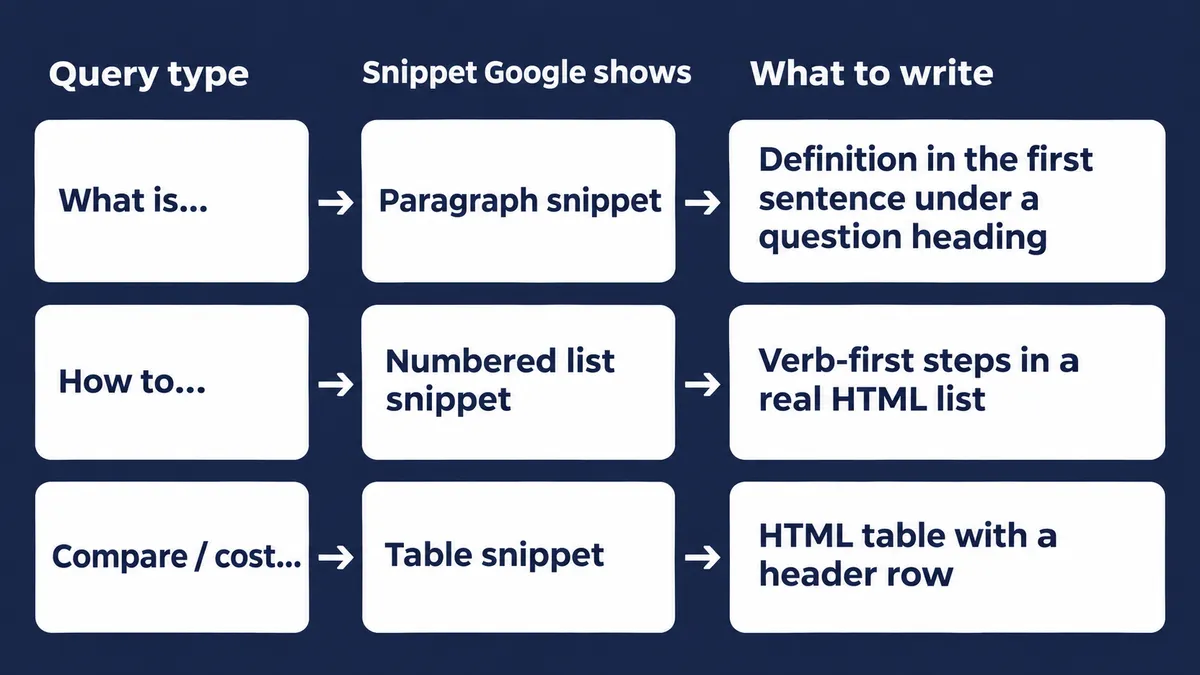
Pages that win tend to hold a short, self-contained block that Google can lift out cleanly. A long essay suits none of these layouts.
Why Snippets Matter for B2B Buyers
Featured snippets matter in business-to-business search because the buying cycle is long and many people take part in it. A snippet puts your page in front of each of them at the exact moment they ask.
Visibility above the organic search results
The snippet sits at the top of the organic search results, below any ads. That is the most visible spot on the page for a question-style query. If you also run PPC, a snippet gives you a second presence on the same page without a second bid.
Brand awareness across a long buying cycle
A company purchase involves research by several people over weeks. If the same brand is quoted each time one of them looks something up, that brand starts to feel familiar and credible. This is how snippets help improve brand awareness even when no click happens. We would not put a number on it, and you should be wary of anyone who does.
Voice and AI replies reuse the same passages
Google said in a 2018 Google post that the format is especially helpful for people on mobile or searching by voice, and that spoken featured snippets cite the source page. Voice search is only part of it. AI tools also pull short, clear passages, which we cover in the AI Overviews section below.
Do Snippets Bring Clicks? The Honest Trade-Off
Featured snippets can bring clicks, but not always. A snippet settles the query on the page itself, so for some searches the reader never needs your site. That is the same pattern we describe in our post on zero-click searches.
Here is what the evidence says, with its limits:
- A snippet counts as one of ten listings. Google’s Danny Sullivan said in January 2020 that a page elevated into the snippet position is no longer repeated in the organic listings. So winning the snippet replaces your regular page-one listing rather than adding a second one.
- Click share was lower in 2017. The Ahrefs study found a snippet at the top got about 8.6% of clicks on average, the result below it about 19.6%, and a number one result with no snippet about 26%. This was before AI Overviews, so treat it as direction, not a current benchmark.
- Google says snippets send visitors. Its 2018 announcement stated that featured snippets “do indeed drive traffic” to sites.
Our rule of thumb: chase snippets for “how,” “compare” and “which” queries, where the quoted passage makes people want the full explanation. For one-line facts, the snippet may keep the click. That can still be fine if brand exposure is the goal.
How to Find Snippet Opportunities
Finding featured snippet opportunities comes down to three habits: start from what you already rank for, check what Google shows today, and collect the queries your buyers type.
Start with queries you already rank for
Open Search Console and filter queries where your pages sit in positions two to ten. These are your closest candidates, since a page usually needs page-one rankings to win. Search Console’s help page notes that a featured snippet has a link to its source and so typically occupies position one. A page that suddenly jumps to position one with a different click rate may have just won one.
Check what Google shows today
Search the query yourself and note the layout and the page that holds it. Is it a paragraph, a list or a table? Who owns it? SEO tools such as Ahrefs and Semrush can also filter keywords by SERP features, which saves you checking one query at a time.
Mine questions from buyers and People Also Ask
The best snippet targets are real buyer queries. Pull them from People Also Ask boxes, sales calls and support tickets. We lay out that whole routine in a keyword research process built around buyers, so we will not repeat it here.
How to Win a Featured Snippet in 6 Steps
You win a featured snippet by giving Google a short, clean reply to a query it already associates with your page. These six steps are the process we would follow.
- Pick a query you rank on page one for, where a snippet already shows. Do not start from scratch with a query you cannot rank for.
- Match the layout Google uses now. If Google shows a numbered list, write a numbered list. A paragraph where the page wants steps rarely wins.
- Put the question in a heading and the reply in the first sentence below it. For paragraph snippets, practitioners commonly aim for about 40 to 60 words. That is a rule of thumb from industry guides, not a Google rule.
- Use real HTML lists and tables. Content locked in images, tabs or PDFs is hard to quote.
- Add depth after the reply. The snippet should whet the appetite. The rest of the page earns the click.
- Re-check the SERP after Google recrawls. Snippets move around. Adjust the layout or the wording and look again.
A worked example
Say you sell contract management software and want to win “what is a data processing agreement.” This example is illustrative, not a real result.
Before: The section opens with three sentences about your company, uses terms like “controller” and “processor” with no explanation, and gives the definition in the third paragraph.
After:
What is a data processing agreement?
A data processing agreement is a contract between a company and a vendor that handles personal data for it. It sets out what data the vendor may process, why, how it must protect that data, and what happens when the work ends.
The second version replies in the first sentence, defines its terms in plain words and sits under a question heading. Everything else, such as who needs one and what to include, can follow below.
Why Business Pages Lose Snippets
Business pages lose featured snippets for a handful of repeatable reasons, and most are easy to fix once you spot them.
- The key passage is buried under a company intro. Google quotes passages, so it needs the definition near the question.
- Jargon with no plain definition. If a term needs a glossary to understand, it is a poor quote.
- Content gated behind forms or locked in PDFs. Google cannot quote what it cannot read.
- Content hidden in images, sliders, or tabs loaded by script. Keep the passage as plain copy on the page.
- One paragraph trying to cover five topics. Split them into separate sections with their own headings.
- Accidental opt-outs. Per Google’s snippet documentation, a
nosnippetrule blocks all snippets, and a lowmax-snippetvalue makes a featured snippet less likely, though Google says it does not guarantee that.
The reverse is useful too. If you do not want pricing or legal wording quoted, Google’s data-nosnippet attribute keeps marked copy out of featured and regular snippets.
Does Structured Data Help You Win a Snippet?
Structured data does not give a page a featured snippet. Google says you cannot mark a page up to become one. Markup makes a page eligible for rich results, which is a different feature.
The picture has also narrowed. Google limited FAQ rich listings to well-known government and health sites in August 2023, and it stopped showing HowTo rich listings the next month. So do not add markup hoping for a snippet. Schema still helps search engines understand what your page is about, and that is worth doing for its own sake. If you are new to it, read a beginner’s guide to schema markup.
Featured Snippets vs AI Overviews
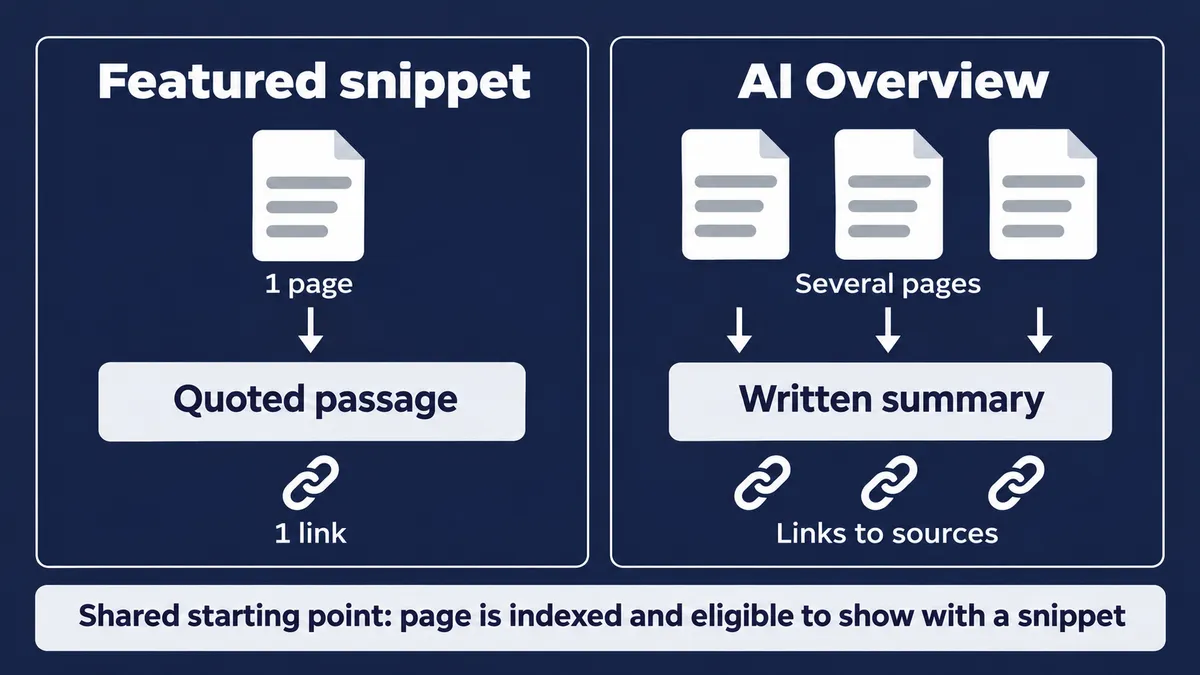
Featured snippets quote one page, while AI Overviews write a summary from several sources and link to them. Both show up at the top of Google, and they overlap in what they reward.
- Source: a snippet uses one page. An AI Overview uses many.
- Reply: a snippet quotes wording from the page. An AI Overview writes new wording.
- Attribution: a snippet links to one source. An AI Overview links to several.
Google’s AI features documentation says there are no additional requirements to appear in AI Overviews or AI Mode, and no special optimizations are needed. The page must be indexed and eligible to show with a snippet. That makes snippet eligibility the entry ticket for both.
The same direct writing also helps answer engines such as ChatGPT and Perplexity quote you. We cover that in our guides to answer engine optimization and generative engine optimization.
How to Track Snippets Over Time
Track featured snippets with a rank tracker that records the page’s extra boxes, and cross-check it against Search Console. The tracker shows which keywords have a snippet and who holds it. Search Console shows whether your own pages are reaching position one.
Snippets change often, so check monthly. A page that held one in March may have lost it by June because a competitor posted a tighter definition. Keep a short list of your target queries and record the holder each time. If you also want to track your visibility in AI answers, keep that as a separate report, since the two behave differently.
Where to Start
Ask your sales team which questions buyers raise most often, then pick five queries you already rank for on page one and look at what Google shows for each. Rewrite the key passages on those pages using the six steps above, then check again in a month. Treat it as an experiment, because Google makes the final call. Share what you learn with the wider marketing team, since the same clear wording helps ads, sales pages and email too.
If you want help deciding which queries are worth the effort, talk to us about your search visibility. Our broader SEO services cover the content and technical SEO work that makes pages eligible in the first place.
Frequently Asked Questions
Are featured snippets still a thing?
Yes. Google still shows featured snippets and documents how they work. AI Overviews now appear next to them for many queries, and Google says a page needs no extra work to appear there beyond being indexed and eligible to show with a snippet. Writing clear answers for snippets also helps your pages in AI results.
What does a Google snippet look like in practice?
Search for a definition such as "what is a data processing agreement." Google may show a box above the regular results with a two-sentence answer quoted from one page, plus that page's title and link. That box is a paragraph featured snippet. Other queries return numbered lists, bulleted lists or tables instead.
How do you get a featured snippet?
Start with a page that already ranks on page one for the query. Match the format Google shows today, put the question in a heading, and answer it in the first sentence below. Use real HTML lists and tables, then add depth after the answer so the click is worth making.
What is the difference between snippets and rich results?
A featured snippet is a box above the results that quotes text from one page, and you cannot mark a page up to get one. Rich results come from structured data and add details such as ratings to a normal listing. They are two different search features.
Do snippets reduce clicks?
Sometimes. A 2017 Ahrefs study found lower click rates on average when a snippet appears, though how-to and comparison queries often earn the visit anyway. Google counts the snippet as one of the ten page-one listings and does not repeat the page lower down.
How do snippets relate to AI Overviews?
A featured snippet quotes one page, while an AI Overview writes a summary from several sources and links to them. Both start from the same base: a page that is indexed and eligible to show with a snippet. The answer-first writing that wins one also helps with the other.

Written by
Adriaan van Swieten
Adriaan leads Stijg Media and works directly on search, AI visibility, websites, and local growth strategy.
Meet Adriaan