You open an AI visibility dashboard and see a green arrow. Your score is up. More answers mention your brand. Then your boss asks a fair question:
“What did we get from it?”
That is where the simple score stops being useful.
Maybe you have also searched for your company in ChatGPT, checked a few answers in Perplexity, or found visits from AI tools in Google Analytics. Each check gives you a piece of the story. None gives you the whole story.
The answer is not to find one better score. It is to track four things on their own:
- Where your brand appears in a fixed set of AI answers.
- How the AI describes and supports that answer.
- Whether people visit your site from an AI tool.
- Whether those visits or recommendations lead to useful business results.
Once you keep those parts separate, you can build a report that says something honest and useful.
Start by deciding what you mean by visibility
People often use “AI visibility” to mean several different things. That causes trouble because a mention is not a click, and a click is not a sale.
Use these terms in your report:
| Signal | What it tells you | What it does not tell you |
|---|---|---|
| Mention | An AI answer named your brand | How many people saw the answer |
| Citation | An AI answer linked to or used a page as a source | Whether anyone clicked the link |
| Impression | A platform reported that your link appeared to a user | Whether the user noticed it or took action |
| Referral visit | Someone clicked from an AI tool to your site | Whether AI played a part in other visits |
| Business result | A person became a lead, sale, subscriber, or other useful outcome | Whether one AI answer caused the whole result |
You need all five signals because they answer different questions. If you put them into one score, you lose the difference between being named, being seen, being visited, and being chosen.
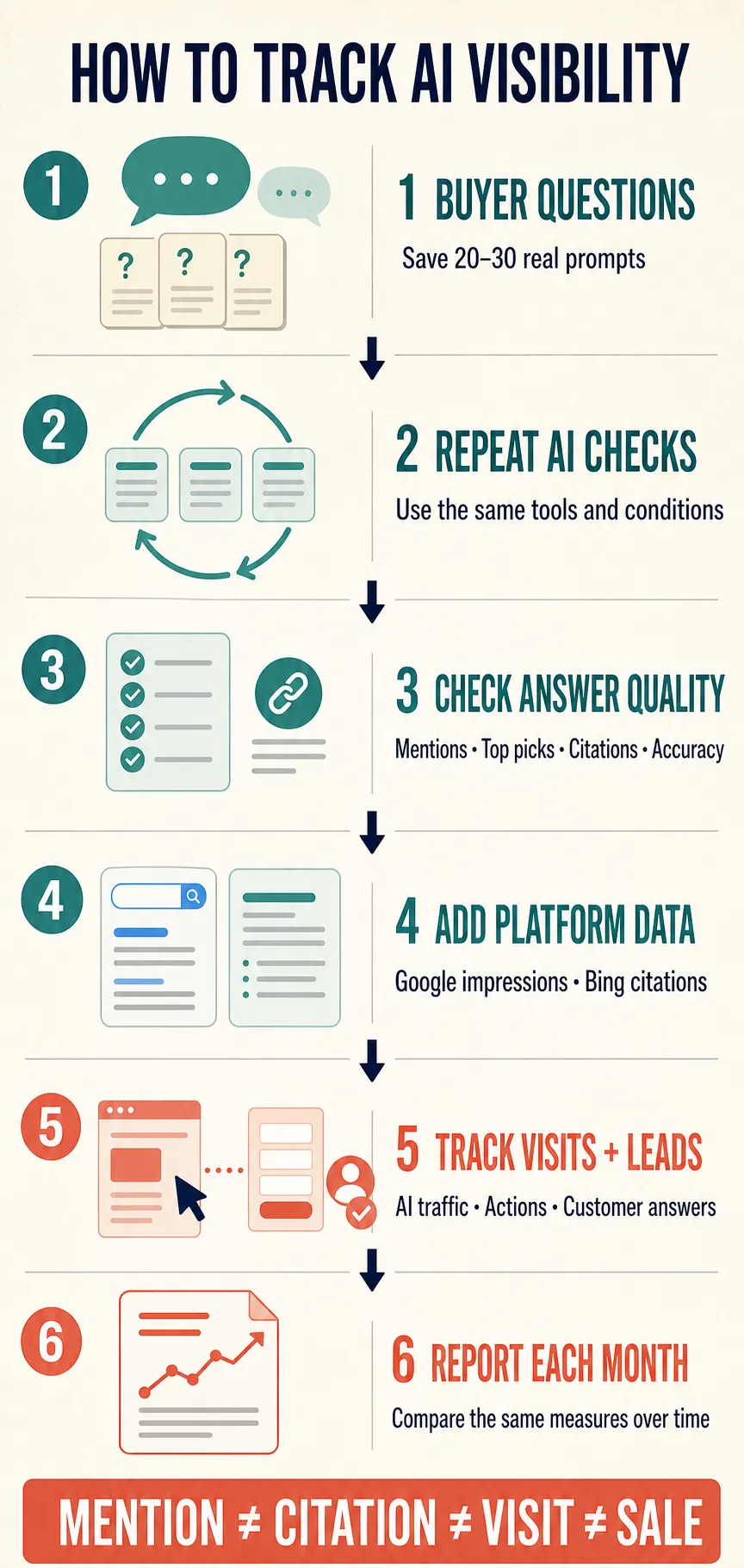
1. Build a list of questions your buyers really ask
Most AI tracking starts with prompts. A prompt is simply the question someone types into ChatGPT, Gemini, Perplexity, or another AI tool.
The quality of your tracking depends on the quality of this list.
Start with 20 to 30 questions. That is enough to show a pattern without creating a large job. Pull the questions from places where customers already speak in their own words:
- Sales calls
- Contact forms
- Email threads
- Live chat and support tickets
- Customer interviews
- Search Console queries
- Questions asked during demos or estimates
Do not clean up the language too much. A customer may ask, “Which payroll tool is easiest for a five-person company?” They may not ask, “What is the best small-business payroll software?” The first question carries more detail about what they need.
Your list should cover several points in the buying process:
- Discovery: “What are the best options for [need]?”
- Comparison: “How does [your brand] compare with [competitor]?”
- Trust: “Is [your brand] reliable?”
- Fit: “Does [your brand] work for [specific situation]?”
- Cost: “How much does [service or product] cost?”
- Decision: “Which company should I choose for [need] in [location]?”
Keep branded and non-branded questions in separate groups. “Is Acme reliable?” tests what AI says about a known company. “What are the best payroll companies for a small restaurant?” tests whether Acme gets discovered at all. Those are not the same win.
Save the first list and leave it alone. You can add a second group later, but keep the main set fixed so this month can be compared with last month.
2. Run the same test under the same conditions
There is no single AI search result for a prompt. The answer can change when you repeat the same question. It can also change with the date, model, location, account, or earlier messages in the chat.
Recent research on AI search measurement found that answers and citation patterns can vary enough to make one check misleading. The practical lesson is simple: do not measure once. Treat the result as a sample, not a fixed rank.
For each check, save:
- The exact prompt
- The AI tool and search mode used
- The date
- Your location or target market
- Whether you were signed in
- The model name, when shown
- The full answer
- Every source or citation
Run each prompt more than once when you build the first baseline. Then repeat the full set on a fixed schedule. A weekly check for the first month can show whether a result keeps appearing or was a one-off answer.
Use a new chat for each prompt unless you want to test a set of follow-up questions. Earlier messages can shape later answers. If you do test a conversation, save the whole sequence.
You do not need to check every AI tool. Pick the ones your buyers are most likely to use. For many companies, that may mean ChatGPT Search, Google AI Mode or Gemini, Perplexity, and Microsoft Copilot. Claude may also matter for some audiences.
3. Track the quality of the answer, not only the mention
A brand can appear in an answer and still get little value from it.
Being the first recommendation in a list of three is not the same as being the last name in a list of twelve. A link to your pricing page is not the same as a link to an old blog post. A positive description is not the same as an answer with the wrong price or service area.
Track these measures for your saved prompt list:
- Mention coverage: The share of prompts where your brand appears.
- Top-pick rate: How often your brand appears first or as the main recommendation.
- Citation coverage: How often the answer links to your site.
- Competitor coverage: Which competitors appear when you do not.
- Source mix: Which websites the AI uses to support its answer.
- Accuracy: Whether the answer gets your services, prices, locations, and claims right.
- Tone: Whether the answer recommends, warns about, or merely lists your brand.
- Commercial fit: Whether you appear for questions tied to work you want.
Also save the answer length and the number of brands named. If your mention count rises only because the AI started giving longer lists, your real position may not have improved.
This is why raw answers matter. A clean score can hide the reason it changed.
4. Add data from Google and Bing
Prompt checks are samples. When a search platform gives you data from its own system, add it to the report.
Google now has a Generative AI performance report in Search Console. It covers AI Overviews and AI Mode and shows impressions by page, country, date, and device. Google is still rolling it out, so not every site has access. The report shows which pages appeared, but the dedicated view does not yet show the query or the click that went with that exposure. You can read the current limits in Google’s report guide.
If you have access, export the data each month. Look for:
- Pages gaining or losing AI impressions
- Countries and devices where the change happened
- Commercial pages appearing instead of only broad articles
- Changes that line up with work you published or updated
Microsoft also offers an AI Performance report in Bing Webmaster Tools. It shows total citations, pages cited, changes over time, and a sample of the phrases used to find source material. It covers Microsoft Copilot, AI summaries in Bing, and some partner uses. Microsoft warns that a citation count does not show where the page appeared or how much weight it had in one answer. That warning is worth keeping in your own report. See Microsoft’s description of the report.
Google impressions and Bing citations are better than a guess, but they still measure exposure. Do not present them as visits, leads, or sales.
5. Track the people who reach your site
The next step is to see what people do after they click.
Google Analytics 4 now has an AI Assistant channel for visits from AI tools it recognizes. You can also use session source and medium to see which tool sent the visit. OpenAI helps with this by adding utm_source=chatgpt.com to links from ChatGPT search, according to its publisher guide.
For AI referral traffic, check:
- Sessions
- Landing pages
- Engaged sessions
- Key events
- Form submissions
- Demo requests
- Purchases or revenue, when available
- Conversion rate compared with other sources
Do not stop at the visit count. Ten people who read a pricing page and request three demos may matter more than 100 people who leave after a few seconds.
Referral data also has a limit: it only covers clicks that reach your site with the source information still attached. A person may read an AI answer, remember your name, and search for you later. They may copy the URL or visit from another device. That visit could appear as search or direct traffic instead.
In other words, analytics can show known AI visits. It cannot show every case where an AI answer played a part.
6. Ask customers how they found you
Your analytics will miss some AI-led visits, so ask people.
Add an open text field to your form:
How did you first hear about us?
Do not make “ChatGPT” one of five forced choices. Let people answer in their own words. They may write “an AI search,” “Gemini,” “Perplexity,” “Google’s AI answer,” or something else you did not expect.
You can also:
- Ask the question during sales calls
- Tag AI mentions in your CRM
- Review chat and email messages for phrases such as “ChatGPT recommended you”
- Record which service, product, or page the person asked about
This data will be messy and incomplete. It is still useful because it comes from a real person who took action.
Branded searches and direct traffic can also support the story when they rise at the same time, but treat them as clues. They do not prove that an AI answer caused the change.
Put the results into one monthly report
Your monthly report does not need a large dashboard. A short table can do the job.
| Part of the report | Main measure | Useful split |
|---|---|---|
| Saved prompt test | Mention coverage and top-pick rate | AI tool, buyer stage, branded vs. non-branded |
| Source use | Citation coverage and cited pages | AI tool, topic, page type |
| Platform data | Google AI impressions and Bing citations | Page, country, device, month |
| Site visits | AI Assistant sessions and conversion rate | Source, landing page, key event |
| Business results | Qualified leads, sales, or pipeline with AI evidence | Product, service, deal stage, stated source |
Add two short notes below the table:
- What changed in the tracking setup, model, prompt list, or platform?
- What did your team publish, update, or fix during the period?
That keeps you from giving your work credit for a change caused by a new model or a different test.
A useful report might read like this:
Our brand appeared in 14 of 25 buying prompts this month, up from nine. Two service pages gained Google AI impressions. AI Assistant visits led to three demo requests, and two prospects said ChatGPT helped them find us. We updated our comparison page during the period. The numbers moved in the right direction, but they do not yet prove that the page update caused the gains.
That is more useful than “AI visibility rose 22%.” It tells the reader what moved, where it moved, and what remains unknown.
Should you use a spreadsheet or a paid tool?
Start with a spreadsheet if you have a small prompt list, a few competitors, and one market. The manual work forces you to read the answers, which helps you spot wrong claims and weak mentions that a score may hide.
A paid tool starts to help when you need to track many prompts, products, competitors, or locations. It can also save the history and make repeat checks easier.
Before paying, ask:
- Where do the prompts come from?
- Can you add and keep your own prompts?
- Does the tool check the public product or an API?
- Can it set the country or local area?
- How often does it repeat each prompt?
- Can you read and export the raw answers?
- Does it show model or platform changes?
- Does it explain how each score is calculated?
These questions matter because tools do not all collect data in the same way. For example, Semrush describes a mix of prompt databases and custom prompt tracking, while Ahrefs describes search-backed prompt estimates and custom prompts. Neither method is a record of every private question real users ask.
Use a paid tool to run a larger, steadier test. Do not mistake its score for a count of your audience.
Avoid these seven common mistakes
- Checking once. One answer can change the next time you ask.
- Changing the prompt list. You cannot compare two periods if you changed the test halfway through.
- Mixing branded and non-branded questions. They measure brand knowledge and brand discovery, which are different.
- Ignoring location and account state. Local results and signed-in answers may change what appears.
- Counting crawler visits as visibility. A bot reading your site does not mean a person saw your brand.
- Treating every mention as equal. First choice, last choice, praise, and warning should not get the same score.
- Calling referral traffic complete attribution. It misses people who do not click or who return another way.
Build the baseline before you try to improve it
Start with the questions your customers already ask. Save 20 to 30 of them, run them across the two or three AI tools that matter most, and keep the full answers.
Then export any Google and Bing data you have, create an AI Assistant view in analytics, and add one open question to your lead form.
Save that first report. Run the same checks again in four weeks.
You still will not have one perfect AI visibility number. You will have something better: a clear record of where your brand appeared, what the answer said, who reached your site, and whether any of it helped the business.

Written by
Adriaan
Adriaan leads Stijg Media and works directly on search, AI visibility, websites, and local growth strategy.
Meet Adriaan