Local search optimization starts with making it glaringly obvious which page on your site should rank for every service and location you target.
Sounds simple, right? In reality, local business websites shoot themselves in the foot all the time. They use overlapping pages, generic service content, weak location signals, and internal links that leave Google totally confused about which pages actually matter.
We saw this exact scenario play out with a therapist in Arvada, Colorado.
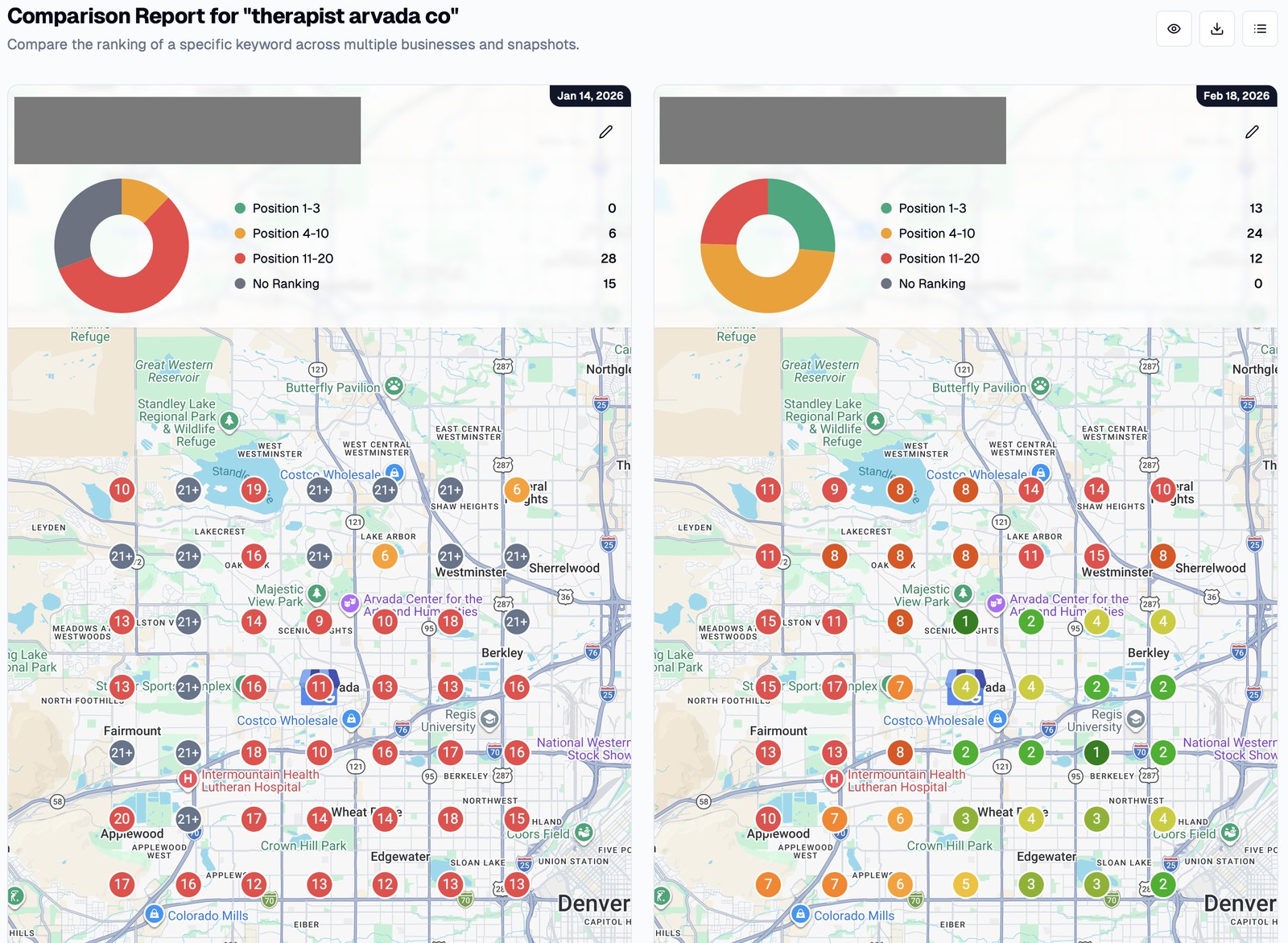
She had a legitimate practice, real reviews, a fully fleshed-out Google Business Profile, and an established website. But for the search term most likely to drive appointments—“therapist arvada co”—she had zero top-three map rankings across our tracked area.
A few weeks later, she had 13.
We didn’t build a single new backlink.
The biggest fix was surprisingly simple: we just stopped her own pages from competing with one another.
This perfectly illustrates the golden rule of local SEO:
Before you create more pages or build more authority, make sure Google actually understands which existing page is supposed to rank for what.
1. Give Every Important Search One Clear Page
Keyword cannibalization happens when multiple pages on your site compete for basically the same search intent.
A therapist might accidentally end up with:
- a homepage targeting “therapist in Arvada”
- a general therapy page targeting “Arvada therapist”
- an individual counseling page targeting “therapy Arvada”
- a handful of blog posts repeating those same terms
- location keywords crammed into the titles of nearly every page
On their own, none of these decisions look disastrous.
But put them together, and you’re forcing Google to pick between several similar URLs instead of handing it one clear winner.
That was exactly the problem with the Arvada site.
Almost every page had similar title tags targeting the same main service and geography. Instead of lifting up one strong page, the site had spawned several weak competitors.
Once we designated a specific URL to own the main query and dialed back the competing signals on the other pages, her rankings jumped within weeks.
How to check your own website
Start in Google Search Console.
Take one of your most important local search queries and see which pages are getting impressions for it. If you see multiple URLs constantly popping up for the same basic intent, you need to dig into why.
You can also run a quick site search:
site:yourdomain.com "your target search"
For example:
site:example.com "emergency plumber boston"
While this isn’t a full cannibalization audit, it gives you a fast look at which pages Google associates with that topic.
Then ask yourself:
If I could pick just one URL from my site to rank for this search, which one would it be?
If Google’s answer doesn’t match yours, you’ve got work to do.
Don’t just go deleting or redirecting the other pages right away. First, figure out if they actually serve genuinely different search intents. A lot of the time, the cleanest fix is just to sharpen the focus of each page so they aren’t stepping on each other’s toes.
One query cluster. One primary ranking URL.
2. Build a Page for Each Important Service
Once you’ve sorted out page ownership, look for gaps in your commercial pages.
A local business can’t rely on a single, generic “Services” page to rank well for every specific thing they do.
If you’re an HVAC company offering:
- AC repair
- furnace repair
- heat pump installation
- boiler repair
- ductless mini-split installation
Those represent totally different customer needs.
Your main services usually need their own dedicated, helpful pages.
A solid service page covers:
- what the service is
- who needs it
- the exact problems it solves
- what your process looks like
- relevant costs or pricing factors (if applicable)
- the service areas you cover
- common customer questions (FAQs)
- why someone should hire you
- the clear next step they should take (Call to Action)
The goal here isn’t to hit some arbitrary word count.
It’s to create the absolute best page on your site for someone searching for that exact service.
If “furnace repair” brings in thousands of dollars a year, don’t bury it in a three-sentence blurb halfway down a generic HVAC page.
Give that search query the dedicated destination it deserves.
3. Build Location Pages Only When the Location Actually Deserves One
Location pages can be incredibly effective.
But they can also devolve into 50 identical copies of the same page where you just find-and-replace the town name. Don’t be that guy.
Don’t spin up pages just because a spreadsheet cranked out every possible combination of:
[service] + [city]
Build a location page only when there’s a real, commercial reason for that URL to exist.
That usually means you have:
- actual search demand in that area
- an area you actively and consistently serve
- past customers or projects from that town
- local testimonials
- location-specific service details (like local building codes)
- different travel, scheduling, or availability factors
- photos or case studies of work you’ve done there
- enough localized context to make the page useful on its own
A Boston page and a Worcester page shouldn’t be identical twins with a different city name slapped on top.
When someone lands on your Worcester page, it should be glaringly obvious that you actually do business there.
Service pages vs. location pages
Think about your site architecture like this:
Service pages answer: “What do you do?”
Location pages answer: “Where do you do it?”
Service + location pages answer: “Do you provide this specific service right here?”
You absolutely do not need every single combination right out of the gate.
Start with the services and markets that drive your highest-value leads. Prove that those pages can rank and convert, and then expand from there.
4. Make Your Location Relevance Obvious
Don’t make Google guess when you can just tell them.
If a page’s whole job is to target a service in a specific market, the topic and geography should be impossible to miss in the page’s key elements.
That normally covers your:
- title tag
- H1 header
- intro copy
- service descriptions
- subheadings
- internal link anchor text
- contact and location info
- supporting proof, like examples and testimonials
This doesn’t mean stuffing “Boston plumber” into the text every 80 words. That’s terrible.
It means writing a page that could only logically be about that specific service in that specific market.
For instance, compare this:
We provide reliable plumbing solutions with exceptional customer service.
With this:
Stijg Plumbing provides emergency plumbing repairs for homeowners and businesses across Norwood, tackling everything from burst pipes to leaking fixtures and busted water heaters.
The second option gives both users and search engines way more context, and it doesn’t read like an SEO robot wrote it.
Specificity always beats repetition.
5. Use Internal Links to Signal Which Pages Matter
Once you’ve got the right pages built, you need to wire them up.
Internal links handle three big jobs:
- They help search engines find your pages.
- They establish the relationships between your services, locations, and supporting content.
- They funnel authority from your strongest pages down to the ones that actually make you money.
Start by figuring out which pages already have some juice to pass along.
Jump into Google Search Console and find pages that are already pulling in decent organic impressions and clicks. Or use a backlink tool to spot pages that have earned external links.
Then figure out where that authority needs to flow.
A blog post about “when to replace a furnace” should naturally link over to your furnace replacement service page.
A location page that mentions emergency services should link straight to your emergency services page.
And your main service pages should link out to the specific locations where you actually provide that service.
Don’t just hide all of this in your top navigation menu.
Contextual links right inside the text tell search engines way more about how two pages are related than dumping 80 links into your footer.
And please, don’t obsess over exact-match anchor text.
Just use natural, descriptive language that makes the relationship obvious:
- emergency furnace repair services
- therapy services in Arvada
- our commercial HVAC installation team
- counseling options for couples
The anchor text should just honestly describe what the user is about to click on.
6. Build Supporting Content Around the Questions Your Customers Actually Ask
Commercial pages are great for capturing people ready to buy right now.
Supporting content (like blog posts) gets you in front of them earlier in their decision-making process.
The best place to find topics for this isn’t a fancy keyword tool.
It’s your own customers.
Start writing down the questions people ask you before they pull the trigger.
A therapist probably hears these all the time:
- Is online therapy as effective as going in person?
- How much does therapy cost?
- How often should I see a therapist?
- Do I need individual or couples counseling?
- Does my insurance cover therapy?
A plumber is going to hear a totally different set of questions.
These questions make for amazing supporting pages because they bridge the gap between what people are researching and the actual services you sell.
You can use Google’s “People Also Ask” boxes, Search Console queries, and competitor sites to expand your list.
Once you write the articles, make sure to hook them back into your relevant commercial pages using internal links.
Your blog shouldn’t just be a random collection of traffic that never converts.
It needs to actively support the services that keep the lights on.
7. Reinforce the Business Entity
Local search isn’t just about reading pages.
Google is trying to understand the actual business behind the website.
Your site needs to consistently communicate the facts:
- business name
- address (if you have a physical location)
- phone number
- service area
- primary services
- organization details
- key people on your team
- external profiles and trusted references (like your BBB profile or local chamber of commerce)
Your “About” and “Contact” pages aren’t just filler.
They’re critical for establishing who you are, where you work, and how you fit into the local web ecosystem.
Structured data (schema markup) can help clarify this stuff for search engines, but it’s not a band-aid. You can’t just use schema; the actual information needs to be clearly visible on the page itself.
Your schema markup should just describe reality, not try to fake it.
8. Optimize the Page for the Lead, Not Just the Ranking
A #1 ranking that doesn’t generate a single inquiry is basically worthless.
Every crucial local landing page should make the next step painfully obvious for the user.
For most local businesses, that means some mix of:
- a highly visible phone number
- click-to-call functionality on mobile
- a short, easy-to-use contact form
- a clearly defined service area
- your business hours or expected response times
- real reviews or testimonials
- relevant licenses or credentials
- actual photos of your team or your work (skip the stock photos)
- a strong, specific call to action
If someone is frantically searching for an emergency plumber at 11 PM because their basement is flooding, they don’t care about your company history. They just need your phone number.
Always match the friction of your conversion path to the urgency of the search.
9. Measure Local Rankings Geographically
Here’s one last huge mistake people make: checking a local ranking from their office and assuming everyone else sees the exact same results.
They don’t.
Local rankings shift based on the physical location of the person doing the searching.
That’s exactly why we tracked that Arvada therapist using a geographic grid tool, rather than just looking at a single ranking position.
Before the optimization, her target query looked like this:
- 0 top-three grid positions
- 15 grid locations where the business didn’t rank at all
After the cleanup:
- 13 top-three positions
- 0 locations with no ranking
That data paints a way more useful picture than just saying, “Oh, the keyword moved from position seven to position three.”
If you’re a local business, you need to measure your visibility across the actual territory your customers live in.
Then, you tie that visibility back to the metrics that pay the bills:
calls, inquiries, bookings, and revenue.
Where I Would Start Today
Don’t kick things off by publishing another 30 random blog posts.
Don’t start by buying sketchy backlinks.
And whatever you do, don’t auto-generate a landing page for every single suburb within a 50-mile radius.
Start with the website you already have sitting right in front of you.
Pick out your top five highest-value local searches and ask yourself these four questions for each one:
- Which specific URL should rank for this?
- Is Google currently picking that URL?
- Does that page actually do a great job satisfying both the service and the location intent?
- Are the strongest, most relevant pages on your site internally linking to it?
If you answer “no” to any of those, fix that foundational stuff before you add any more complexity.
That’s exactly the playbook we used for the therapist in Arvada.
Her website didn’t need more authority.
It just needed to stop squandering the authority it already had.

Written by
Adriaan
Adriaan leads Stijg Media and works directly on search, AI visibility, websites, and local growth strategy.
Meet Adriaan