You put real work into that page, and when you check Search Console it’s sitting under Crawled - currently not indexed, nowhere near the readers you wrote it for. You’ve already run the usual checklist: robots.txt, the noindex tag, canonical tags, the sitemap, Request Indexing, maybe more than once, and the status hasn’t moved. Here’s the good part: the fix has nothing to do with rewriting a word of it. Ahead: what actually decides whether Google adds a page like this to the index, and the one change that gets it there.
First, rule out the real technical cause
A small number of these cases are genuinely technical, so check properly before moving on.
Open URL Inspection in Search Console, pick one of the stuck pages, and click Test Live URL. Look at what Google actually sees, not just the page you see in your browser. One site owner found their robots.txt blocked every URL with a question mark, meant to stop crawlers wasting time on tracking parameters. A new theme, though, loaded its CSS and JavaScript through those same parameters. Google’s test showed a blank page: a heading, a few boilerplate words, nothing else. Fixing the robots.txt line fixed the indexing.
If your test shows the full page, content and all, a technical block is very unlikely. Stop looking there and move to the real cause.
What the status actually means
Crawled - currently not indexed means Google downloaded your page, read it, and decided, for now, not to store it in the index. It isn’t a queue. The decision has already happened.
This is different from Discovered - currently not indexed, which means Google found the URL but hasn’t visited it yet. That’s a crawling-priority issue, more common on new or fast-growing sites. Crawled - currently not indexed is a page Google has already looked at and judged.
Google’s own search team said as much on a recent podcast: when they’re worried about a site’s overall quality, they crawl less of it and index less of it, and that shows up as pages sitting in this exact status. Their words: “if our systems are seriously worried about the quality of a website… you’ll see things like crawled, not indexed.”
What “not good enough” means in practice
Google’s team called the pages that get skipped “commodity content”: pages that cover a topic the same way dozens of other pages already do, without first-hand experience, original research, or information nobody else has published. That’s real, and worth ruling out on any page you’re unsure about.
But most stuck pages aren’t badly written. They’re isolated. A page earns its spot in the index partly on its own words and partly on authority: the trust that reaches it through links from pages Google already trusts. A page with no incoming links from anywhere else on your own site carries none of that trust, no matter how well it’s written. That absence, more than the writing, is usually the real reason it stays stuck. It’s also why rewriting a page sometimes appears to fix the problem: the rewrite is normally paired with republishing and new internal links, and it’s the links doing the work, not the improved sentences.
Check whether any authority reaches the page
Open a stuck page and look at what links to it from elsewhere on your own site. If the only things pointing to it are the sitemap and a generic archive or tag listing, it has close to no authority reaching it at all. That’s the gap to close, not the prose.
The fix that actually gets stuck pages indexed
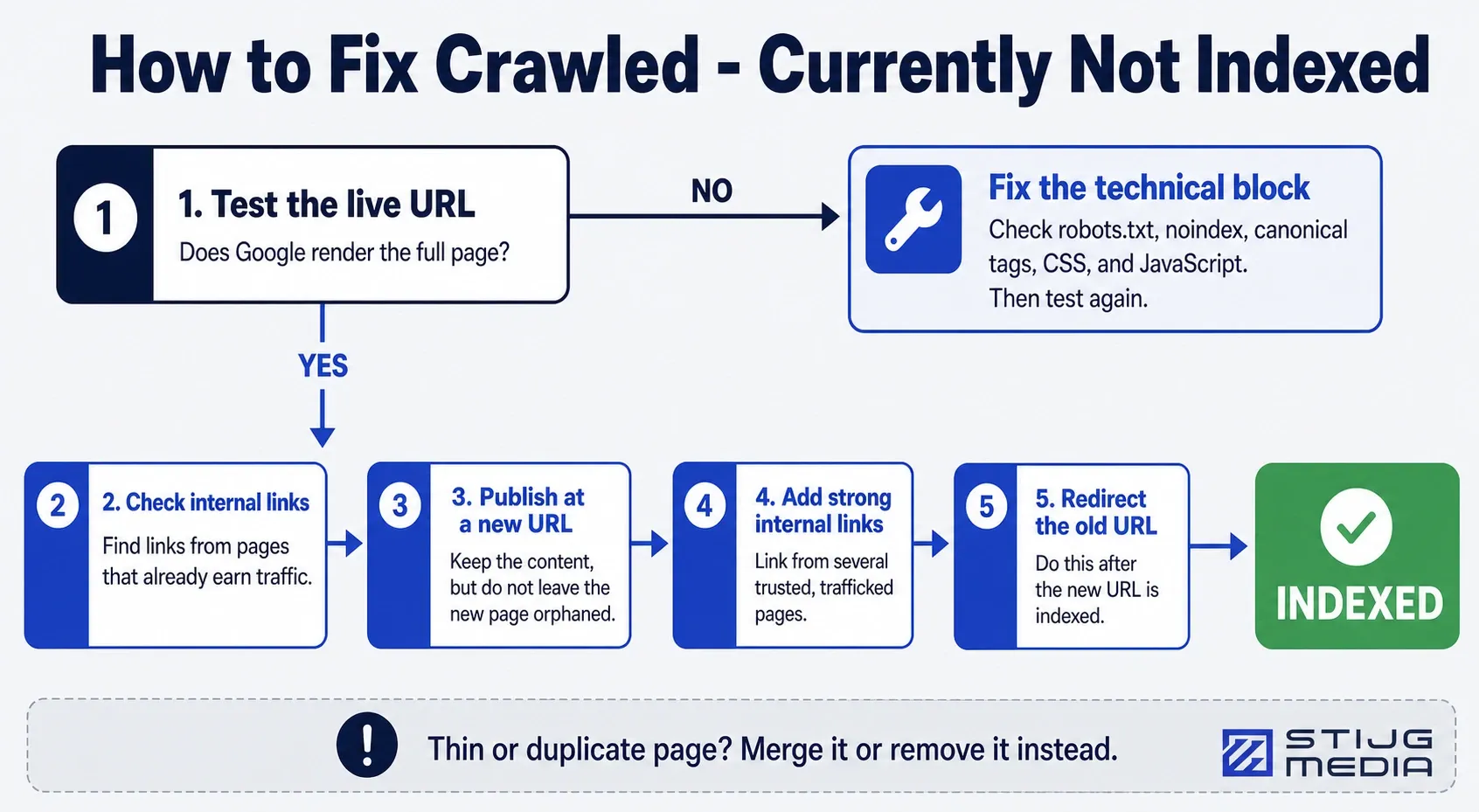
Trying to nudge the same URL back into the index rarely works. Google has already looked at that exact URL and made its call. What reliably works instead: publish the piece again under a new URL.
You can reuse the content as it is, or tighten it up if you want, but a full rewrite isn’t the point. What matters is that the new URL doesn’t arrive as an orphan. Before or right when you publish it, add links to it from a handful of your own pages that already get real traffic. Those links hand the new URL what the old one never had: authority. Do that, and the new URL almost always gets indexed where the old one didn’t.
Once the new page is indexed, redirect the old URL to it, so you’re not left running two copies of the same content.
For pages that are genuinely thin or near-duplicates of something else on your site, merging or removing them beats trying to force any version of them in.
Next step
Open the Page Indexing report now, pick one URL under Crawled - currently not indexed that you actually want ranking, and check how many of your own trafficked pages link to it. If the answer is none, that’s your fix: a new slug, a handful of links from pages that already earn traffic, and a redirect once it’s indexed.

Written by
Adriaan
Adriaan leads Stijg Media and works directly on search, AI visibility, websites, and local growth strategy.
Meet Adriaan